
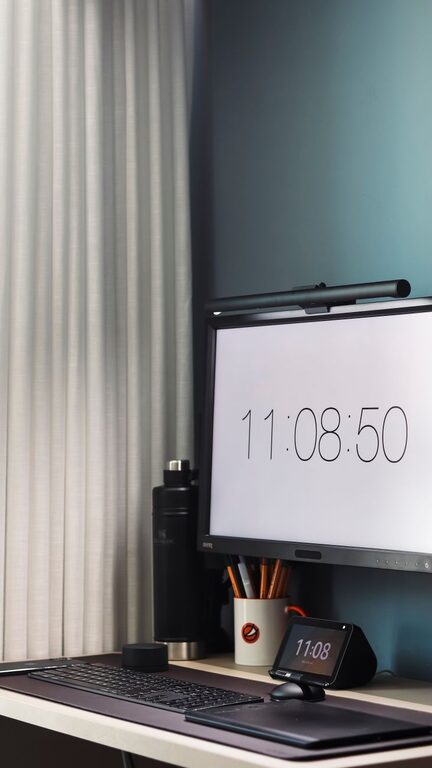
Practical Tips for a Clutter-Free Home Workspace
Creating a comfortable and clutter-free home workspace can significantly enhance your productivity and overall well-being. A well-organised environment minimises distractions, helps maintain focus, and creates a positive atmosphere for work. Whether you have a dedicated office room or a small corner in your living space, these tips will help you create an efficient workspace that supports both productivity and comfort.
Why a Clutter-Free Workspace Matters
A cluttered desk or workspace can make it difficult to concentrate, causing unnecessary stress and reducing efficiency. By keeping your area tidy, you can boost your ability to focus, complete tasks more quickly, and feel more relaxed throughout the workday. Comfort is equally important: an ergonomic setup prevents physical strain and encourages good posture, which in turn supports mental focus.
Choosing the Right Space
Assess Your Available Area
First, find a space that suits your work needs. If you have the luxury of a separate room, that’s ideal. If not, a corner of a quiet room can work just as well. Make sure the area has enough room for your desk, chair, and any essential equipment like a computer, printer, or storage units.
Consider Lighting and Ventilation
Natural light boosts mood and alertness, so position your desk near a window if possible. Good ventilation also keeps the space fresh and prevents stuffiness, helping you stay alert and comfortable during work hours.
Setting Up Your Desk
Keep Essentials Within Reach
Having frequently used items close at hand reduces distractions and unnecessary movement. This includes your computer, notebook, pens, and phone. Avoid overcrowding by limiting items on your desk to the essentials.
Invest in Storage Solutions
Drawers, shelves, and organisers help keep paperwork and office supplies tidy and out of sight. Use file holders or trays to sort documents, and small containers for stationery. Label storage areas to find things quickly without creating a mess.
Maintain a Clear Surface
Try to keep your desktop as clear as possible. A clutter-free surface invites a clearer mind and more efficient working habits. At the end of each day, spend a few minutes tidying your desk to prepare for the next day.
Organising Digital and Paper Files
Go Paperless Where Possible
Reducing paper clutter can greatly improve workspace organisation. Scan important documents and store them in clearly labelled folders on your computer or cloud storage. This also makes it easier to find files quickly.
Use a Clear Filing System
For physical documents that must be kept, use a filing cabinet or folders with labels sorted by category, priority, or project. Regularly review and recycle papers you no longer need.
Creating Comfort and Ergonomics
Choose the Right Chair and Desk Height
An adjustable chair with good lumbar support helps maintain proper posture. Your desk should allow your arms to rest comfortably with elbows bent at about 90 degrees while typing or writing.
Position Your Monitor Correctly
The top of your screen should be at eye level and about an arm’s length away. This setup reduces neck strain and eye fatigue.
Add Personal Touches Mindfully
While it is good to personalise your workspace to make it inviting, avoid excessive decorations that add to clutter. A plant, a photo, or a piece of artwork can make the environment more pleasant without being distracting.
Develop Good Habits to Maintain Organisation
Regularly Declutter
Set a weekly or monthly reminder to tidy your workspace. Clear out unnecessary items and reorganise if needed. This prevents clutter from building up over time.
Use a To-Do List or Planner
Keeping track of tasks either digitally or on paper helps reduce the feeling of being overwhelmed. It also keeps your mind clear so you can focus on one task at a time.
Set Boundaries Around Work Time
Especially in a home setting, it’s important to establish boundaries between work and relaxation. Clear start and finish times help maintain motivation and prevent burnout.
Additional Tips for a Productive Environment
– Minimise Noise: Use noise-cancelling headphones or play soft background music to block out distractions.
– Manage Cables: Use cable organisers or clips to keep wires tidy and prevent tangles.
– Keep Hydrated and Take Breaks: Have a water bottle nearby and take short breaks to stretch and refresh your mind.
Conclusion
Organising a clutter-free home workspace is a simple but powerful way to boost both productivity and comfort. By thoughtfully selecting your space, setting up your desk ergonomically, managing files effectively, and developing good habits, you’ll create an environment that supports your best work. Remember, small consistent changes lead to lasting improvements in your workspace and workday.
Start today and enjoy the benefits of a neat, comfortable, and productive home office!
