
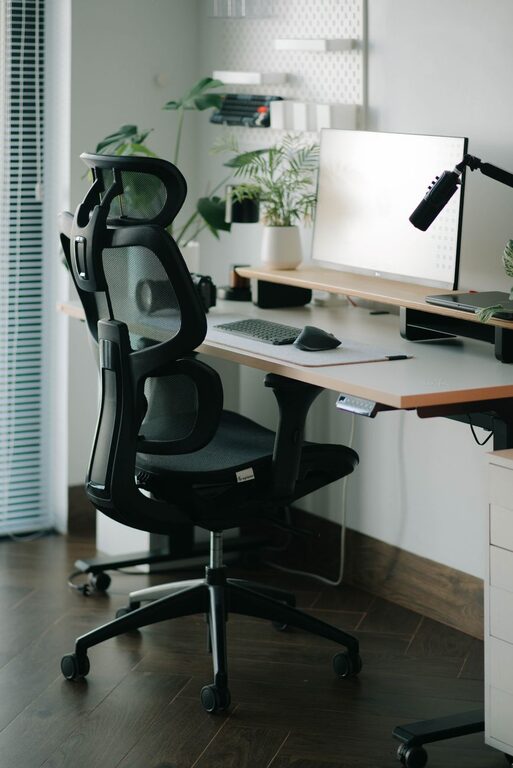
Tips for Creating a Comfortable and Productive Home Office Space
Creating a home office that is both comfortable and productive can transform your work-from-home experience. Whether you are answering emails, attending virtual meetings, or tackling important projects, having a well-organised and inviting space makes all the difference. This guide offers practical advice on how to set up a home office that supports your focus and wellbeing.
Choose the Right Location
Find a Quiet Spot
Select a room or corner of your home that is relatively free from noise and distractions. A quiet space helps you concentrate and signals to others that you are working.
Consider Natural Light
Position your desk near a window if possible. Natural light can improve mood, reduce eye strain, and keep you alert during the day. If natural light is limited, invest in good quality artificial lighting that brightens your workspace evenly.
Invest in Ergonomic Furniture
Comfortable Chair
A good chair supports your lower back and encourages proper posture. Look for adjustable chairs that provide lumbar support and allow your feet to rest flat on the floor.
Suitable Desk Height
Your desk should be at a height where your elbows form a 90-degree angle when typing. This reduces shoulder and wrist strain.
Monitor Placement
Place your monitor so that the top of the screen is at or slightly below eye level. This position helps prevent neck and eye fatigue.
Keep Your Workspace Organised
Declutter
A tidy desk reduces stress and distractions. Regularly clear your work surface of unnecessary items.
Storage Solutions
Use shelves, drawers, or organisers to keep stationery, files, and gadgets neatly stored but within easy reach.
Cable Management
Tidy cables with clips or cable trays to avoid a tangled mess, which can be distracting and unsafe.
Personalise Your Workspace
Add Plants
Indoor plants can freshen the air and add a calming, natural touch to your office.
Inspirational Items
Include photos, artwork, or objects that motivate you, but don’t overcrowd the space.
Choose Calming Colours
Soft, neutral colours often promote focus and creativity. Avoid overly bright or distracting hues unless you find them energising.
Optimise Technology and Connectivity
Reliable Internet
Ensure your internet connection is strong and stable to prevent disruptions during calls or large downloads.
Quality Equipment
Invest in good headphones, a microphone, and a webcam for clear communication during virtual meetings.
Backup Power
Consider a surge protector or uninterruptible power supply (UPS) for important devices to avoid data loss during power outages.
Establish Clear Boundaries
Set Working Hours
Define your start and finish times to create a routine and prevent overworking.
Communicate Boundaries
Inform family or housemates about your work schedule to minimise interruptions.
Separate Work and Relaxation Zones
If space allows, create a clear distinction between your office area and rest spots to help your mind switch off after work.
Prioritise Health and Wellbeing
Take Regular Breaks
Stand, stretch, or walk around every hour to prevent stiffness and eye strain.
Stay Hydrated and Nourished
Keep a water bottle nearby, and remember to eat balanced meals during your breaks.
Manage Screen Time
Use features like blue light filters or apps that remind you to blink and take micro-breaks to protect your eyes.
Lighting Tips for Productivity
Layer Your Lighting
Mix ambient (general), task (focused), and accent (decorative) lighting to create a versatile environment.
Avoid Glare
Position screens and lights to prevent reflections that cause discomfort and make it hard to see.
Final Thoughts
Creating a home office tailored to your needs takes some effort, but the payoff is a better working experience that enhances your comfort, focus, and productivity. By selecting an appropriate space, investing in ergonomic and organisational tools, and fostering healthy work habits, you can build a home office that supports your professional goals while making it a pleasant space to spend your day.
